第一章:应用程序与基本执行环境 · rCore 2024S 随记
Planted April 19, 2024
前言
实际实践参考的文档:rCore Tutorial Guide 2024S。
拥有更为详细细节介绍的 rCore OS 官方文档:rCore-Tutorial-Book-v3。
第一章:应用程序与基本执行环境
引言
本章预期代码树:
├── bootloader (内核依赖的运行在 M 特权级的 SBI 实现,本项目中我们使用 RustSBI)
│   └── rustsbi-qemu.bin
├── os
│   ├── Cargo.toml (cargo 项目配置文件)
│   ├── Makefile
│   └── src
│       ├── console.rs (将打印字符的 SBI 接口进一步封装实现更加强大的格式化输出)
│       ├── entry.asm (设置内核执行环境的的一段汇编代码)
│       ├── lang_items.rs (需要我们提供给 Rust 编译器的一些语义项,目前包含内核 panic 时的处理逻辑)
│       ├── linker.ld (控制内核内存布局的链接脚本以使内核运行在 qemu 虚拟机上)
│       ├── logging.rs (为本项目实现了日志功能)
│       ├── main.rs (内核主函数)
│       └── sbi.rs (封装底层 SBI 实现提供的 SBI 接口)
└── rust-toolchain (整个项目的工具链版本)

cloc os
-------------------------------------------------------------------------------
Language                     files          blank        comment           code
-------------------------------------------------------------------------------
Rust                             5             25              6            155
make                             1             11              4             34
Assembly                         1              1              0             11
TOML                             1              2              1              7
-------------------------------------------------------------------------------
SUM:                             8             39             11            207
-------------------------------------------------------------------------------
应用程序执行环境与平台支持
执行应用程序
按文档要求,我们切回主分支 main。执行命令。
cargo new os
$ tree
.
├── os
│   ├── Cargo.lock
│   ├── Cargo.toml
│   └── src
│       └── main.rs
└── README.md

3 directories, 4 files
$ cd os/
$ cargo run
   Compiling os v0.1.0 (/home/ezra/rCore-Tutorial-Code-2024S/os)
    Finished dev [unoptimized + debuginfo] target(s) in 0.32s
     Running `target/debug/os`
Hello, world!
我们在屏幕上看到了一行 Hello, world! ,但为了打印出 Hello, world!,我们需要的不止几行源代码。
理解应用程序执行环境
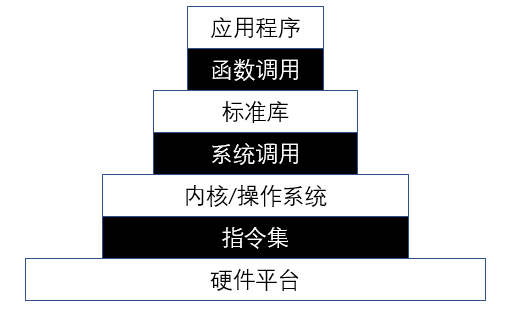
我们的应用程序通过调用标准库或第三方库提供的接口,仅需少量源代码就能完成复杂的功能; Hello, world! 程序调用的 println! 宏就是由 Rust 标准库 std 和 GNU Libc 等提供的。 这些库属于应用程序的 执行环境 (Execution Environment),而它们的实现又依赖于操作系统提供的系统调用。
- 所以我们需要剥离标准库,才能在裸机上执行。操作系统则提供关于标准库的系统调用。
平台与目标三元组
编译器在编译、链接得到可执行文件时需要知道,程序要在哪个 平台 (Platform) 上运行, 目标三元组 (Target Triplet) 描述了目标平台的 CPU 指令集、操作系统类型和标准运行时库。
我们研究一下现在 Hello, world! 程序的目标三元组是什么:
- 在我的环境下:
$ rustc --verbose --version
rustc 1.77.2 (25ef9e3d8 2024-04-09)
binary: rustc
commit-hash: 25ef9e3d85d934b27d9dada2f9dd52b1dc63bb04
commit-date: 2024-04-09
host: x86_64-unknown-linux-gnu
release: 1.77.2
LLVM version: 17.0.6
- 也就是 x86_64 (amd64)、Linux、GNU glibc。
接下来,我们希望把 Hello, world! 移植到 RICV 目标平台 riscv64gc-unknown-none-elf 上运行。
- 注意,接下来没有标准库可供调用。
修改目标平台
将程序的目标平台换成 riscv64gc-unknown-none-elf,试试看会发生什么:
$ cargo run --target riscv64gc-unknown-none-elf
   Compiling os v0.1.0 (/home/ezra/rCore-Tutorial-Code-2024S/os)
error[E0463]: can't find crate for `std`
  |
  = note: the `riscv64gc-unknown-none-elf` target may not be installed
  = help: consider downloading the target with `rustup target add riscv64gc-unknown-none-elf`

error: cannot find macro `println` in this scope
 --> src/main.rs:2:5
  |
2 |     println!("Hello, world!");
  |     ^^^^^^^

error: requires `sized` lang_item

For more information about this error, try `rustc --explain E0463`.
error: could not compile `os` (bin "os") due to 3 previous errors
报错的原因是目标平台上确实没有 Rust 标准库 std,也不存在任何受 OS 支持的系统调用。 这样的平台被我们称为 裸机平台 (bare-metal)。
幸运的是,除了 std 之外,Rust 还有一个不需要任何操作系统支持的核心库 core, 它包含了 Rust 语言相当一部分核心机制,可以满足本门课程的需求。 有很多第三方库也不依赖标准库 std,而仅仅依赖核心库 core。
为了以裸机平台为目标编译程序,我们要将对标准库 std 的引用换成核心库 core。
移除标准库依赖
- 编辑 os/.cargo/config 文件,加入以下内容:
[build]
target = "riscv64gc-unknown-none-elf"
- 这将会持久化设定目标平台的设定为 riscv64gc。
这将使 cargo 工具在 os 目录下默认会使用 riscv64gc-unknown-none-elf 作为目标平台。 这种编译器运行的平台(x86_64)与可执行文件运行的目标平台不同的情况,称为 交叉编译 (Cross Compile)。
移除 println! 宏
我们在 main.rs 的开头加上一行 #![no_std], 告诉 Rust 编译器不使用 Rust 标准库 std 转而使用核心库 core。重新编译,报错如下:
$ cargo run
   Compiling os v0.1.0 (/home/ezra/rCore-Tutorial-Code-2024S/os)
error[E0463]: can't find crate for `core`
  |
  = note: the `riscv64gc-unknown-none-elf` target may not be installed
  = help: consider downloading the target with `rustup target add riscv64gc-unknown-none-elf`

error[E0463]: can't find crate for `compiler_builtins`

error: cannot find macro `println` in this scope
 --> src/main.rs:3:5
  |
3 |     println!("Hello, world!");
  |     ^^^^^^^

error: requires `sized` lang_item

For more information about this error, try `rustc --explain E0463`.
error: could not compile `os` (bin "os") due to 4 previous errors
- 注意到环境配置似乎有些问题,没有安装 riscv64gc-unknown-none-elf 的 target。解决方案如下:
$ rustup target add riscv64gc-unknown-none-elf
println! 宏是由标准库 std 提供的,且会使用到一个名为 write 的系统调用。 无论如何,我们先将这行代码注释掉。
提供语义项 panic_handler
标准库 std 提供了 Rust 错误处理函数 #[panic_handler],其大致功能是打印出错位置和原因并杀死当前应用。 但核心库 core 并没有提供这项功能,得靠我们自己实现。
- 例子:移除了 println! 后,依然存在以下错误。
$ cargo run
   Compiling os v0.1.0 (/home/ezra/rCore-Tutorial-Code-2024S/os)
error: `#[panic_handler]` function required, but not found

error: could not compile `os` (bin "os") due to 1 previous error
新建一个子模块 os/src/lang_items.rs,在里面编写 panic 处理函数,通过标记 #[panic_handler] 告知编译器采用我们的实现:
use core::panic::PanicInfo;

#[panic_handler]
fn panic(_info: &PanicInfo) -> ! {
    loop {}
}
- 不要忘了在 main.rs 里引用你写的 panic。
mod lang_items;即可。
移除 main 函数
- 接下来重新编译,提示在入口点又出现了问题。
$ cargo run
   Compiling os v0.1.0 (/home/ezra/rCore-Tutorial-Code-2024S/os)
error: using `fn main` requires the standard library
  |
  = help: use `#![no_main]` to bypass the Rust generated entrypoint and declare a platform specific entrypoint yourself, usually with `#[no_mangle]`

error: could not compile `os` (bin "os") due to 1 previous error
- 如编译器所说,我们在 main.rs 中加入
#![no_main]即可。
至此,我们终于移除了所有标准库依赖。
- 不过直接执行它是行不通的。不要忘记你使用的是 x86_64 的机器。
- 错误信息如下。
$ cargo run
   Compiling os v0.1.0 (/home/ezra/rCore-Tutorial-Code-2024S/os)
warning: function `main` is never used
 --> src/main.rs:4:4
  |
4 | fn main() {
  |    ^^^^
  |
  = note: `#[warn(dead_code)]` on by default

warning: `os` (bin "os") generated 1 warning
    Finished dev [unoptimized + debuginfo] target(s) in 0.27s
     Running `target/riscv64gc-unknown-none-elf/debug/os`
target/riscv64gc-unknown-none-elf/debug/os: 1: ELF�@�@8@
                                                        : not found
target/riscv64gc-unknown-none-elf/debug/os: 2: Syntax error: "(" unexpected
分析被移除标准库的程序
我们可以通过一些工具来分析目前的程序:
- file 获取简略的文件类型信息。
$ file target/riscv64gc-unknown-none-elf/debug/os
target/riscv64gc-unknown-none-elf/debug/os: ELF 64-bit LSB executable, UCB RISC-V, RVC, double-float ABI, version 1 (SYSV), statically linked, with debug_info, not stripped
- rust-readbj 读取详细符号信息。
$ rust-readobj -h target/riscv64gc-unknown-none-elf/debug/os
Could not find tool: readobj
at: /home/ezra/.rustup/toolchains/stable-x86_64-unknown-linux-gnu/lib/rustlib/x86_64-unknown-linux-gnu/bin/llvm-readobj
Consider `rustup component add llvm-tools-preview
- 哎哟忘记装了,按提示装一下吧。
$ rustup component add llvm-tools-preview
info: downloading component 'llvm-tools'
info: installing component 'llvm-tools'
 29.6 MiB /  29.6 MiB (100 %)  11.3 MiB/s in  2s ETA:  0s
- 装好以后可以读取出以下符号信息。
$ rust-readobj -h target/riscv64gc-unknown-none-elf/debug/os

File: target/riscv64gc-unknown-none-elf/debug/os
Format: elf64-littleriscv
Arch: riscv64
AddressSize: 64bit
LoadName: <Not found>
ElfHeader {
  Ident {
    Magic: (7F 45 4C 46)
    Class: 64-bit (0x2)
    DataEncoding: LittleEndian (0x1)
    FileVersion: 1
    OS/ABI: SystemV (0x0)
    ABIVersion: 0
    Unused: (00 00 00 00 00 00 00)
  }
  Type: Executable (0x2)
  Machine: EM_RISCV (0xF3)
  Version: 1
  Entry: 0x0
  ProgramHeaderOffset: 0x40
  SectionHeaderOffset: 0x1788
  Flags [ (0x5)
    EF_RISCV_FLOAT_ABI_DOUBLE (0x4)
    EF_RISCV_RVC (0x1)
  ]
  HeaderSize: 64
  ProgramHeaderEntrySize: 56
  ProgramHeaderCount: 4
  SectionHeaderEntrySize: 64
  SectionHeaderCount: 12
  StringTableSectionIndex: 10
}
- 反汇编导出汇编程序信息。
$ rust-objdump -S target/riscv64gc-unknown-none-elf/debug/os

target/riscv64gc-unknown-none-elf/debug/os:     file format elf64-littleriscv
通过 file 工具对二进制程序 os 的分析可以看到,它好像是一个合法的 RV64 执行程序, 但 rust-readobj 工具告诉我们它的入口地址 Entry 是 0。 再通过 rust-objdump 工具把它反汇编,没有生成任何汇编代码。 可见,这个二进制程序虽然合法,但它是一个空程序,原因是缺少了编译器规定的入口函数 _start 。
从下一节开始,我们将着手实现本节移除的、由用户态执行环境提供的功能。
构建用户态执行环境
用户态最小化执行环境
执行环境初始化
首先我们要给 Rust 编译器编译器提供入口函数 _start() , 在 main.rs 中添加如下内容:
#[no_mangle]
extern "C" fn _start() {
    loop{};
}
- 和 C、C++ 很像,在程序启动前都存在一个最初的入口点。
- 通过入口点,我们可以为用户态初始化一些必要的资源。
~~ 先写到这,形势与政策课 iYanDa 校园网不好,连不上实验实例了。下节课再写。 ~~
- 重新执行
cargo build构建 os 程序,程序正常编译,反编译后可以导出两行死循环汇编。正是我们需要的效果 。
$ cargo build
   Compiling os v0.1.0 (/home/ezra/rCore-Tutorial-Code-2024S/os)
warning: function `main` is never used
  --> src/main.rs:10:4
   |
10 | fn main() {
   |    ^^^^
   |
   = note: `#[warn(dead_code)]` on by default

warning: `os` (bin "os") generated 1 warning
    Finished dev [unoptimized + debuginfo] target(s) in 0.28s
$ rust-objdump -S target/riscv64gc-unknown-none-elf/debug/os

target/riscv64gc-unknown-none-elf/debug/os:     file format elf64-littleriscv

Disassembly of section .text:

0000000000011158 <_start>:
;     loop{};
   11158: 09 a0         j       0x1115a <_start+0x2>
   1115a: 01 a0         j       0x1115a <_start+0x2>
反汇编出的两条指令就是一个死循环, 这说明编译器生成的已经是一个合理的程序了。 用 qemu-riscv64 target/riscv64gc-unknown-none-elf/debug/os 命令可以执行这个程序。
$ qemu-riscv64 target/riscv64gc-unknown-none-elf/debug/os
^C (that loop stuck here so send SIGINT to exist)
$
- 如果注释 _start 中的死循环,再次构建运行。将会触发段错误。这是因为我们还没有一个健全的返回机制。
$ cargo build
   Compiling os v0.1.0 (/home/ezra/rCore-Tutorial-Code-2024S/os)
warning: function `main` is never used
  --> src/main.rs:10:4
   |
10 | fn main() {
   |    ^^^^
   |
   = note: `#[warn(dead_code)]` on by default

warning: `os` (bin "os") generated 1 warning
    Finished dev [unoptimized + debuginfo] target(s) in 0.14s
$ qemu-riscv64 target/riscv64gc-unknown-none-elf/debug/os
Segmentation fault
目前的执行环境还缺了一个退出机制,我们需要操作系统提供的 exit 系统调用来退出程序。
- 用了很多内联汇编,看文字的意思大概是暂时不需要理解。
// os/src/main.rs

const SYSCALL_EXIT: usize = 93;

fn syscall(id: usize, args: [usize; 3]) -> isize {
    let mut ret;
    unsafe {
        core::arch::asm!(
            "ecall",
            inlateout("x10") args[0] => ret,
            in("x11") args[1],
            in("x12") args[2],
            in("x17") id,
        );
    }
    ret
}

pub fn sys_exit(xstate: i32) -> isize {
    syscall(SYSCALL_EXIT, [xstate as usize, 0, 0])
}

#[no_mangle]
extern "C" fn _start() {
    sys_exit(9);
}
- 再次构建 os 并执行。这次执行时就没有出现段错误了。
$ qemu-riscv64 target/riscv64gc-unknown-none-elf/debug/os
$
有显示支持的用户态执行环境
没有 println 输出信息,终究觉得缺了点啥。
Rust 的 core 库内建了以一系列帮助实现显示字符的基本 Trait 和数据结构,函数等,我们可以对其中的关键部分进行扩展,就可以实现定制的 println! 功能。 实现输出字符串的相关函数
首先封装一下对 SYSCALL_WRITE 系统调用。
const SYSCALL_WRITE: usize = 64;

pub fn sys_write(fd: usize, buffer: &[u8]) -> isize {
  syscall(SYSCALL_WRITE, [fd, buffer.as_ptr() as usize, buffer.len()])
}
然后实现基于 Write Trait 的数据结构,并完成 Write Trait 所需要的 write_str 函数,并用 print 函数进行包装。
struct Stdout;

impl Write for Stdout {
    fn write_str(&mut self, s: &str) -> fmt::Result {
        sys_write(1, s.as_bytes());
        Ok(())
    }
}

pub fn print(args: fmt::Arguments) {
    Stdout.write_fmt(args).unwrap();
}
最后,基于 print 函数,实现 Rust 语言格式化宏 ( formatting macros )。
#[macro_export]
macro_rules! print {
    ($fmt: literal $(, $($arg: tt)+)?) => {
        $crate::console::print(format_args!($fmt $(, $($arg)+)?));
    }
}

#[macro_export]
macro_rules! println {
    ($fmt: literal $(, $($arg: tt)+)?) => {
        print(format_args!(concat!($fmt, "\n") $(, $($arg)+)?));
    }
}
接下来,我们调整一下应用程序,让它发出显示字符串和退出的请求:
#[no_mangle]
extern "C" fn _start() {
    println!("Hello, world!");
    sys_exit(9);
}
现在,我们编译并执行一下,可以看到正确的字符串输出,且程序也能正确退出!
$ cargo build --target riscv64gc-unknown-none-elf
   Compiling os v0.1.0 (/home/ezra/rCore-Tutorial-Code-2024S/os)
warning: function `main` is never used
  --> src/main.rs:65:4
   |
65 | fn main() {
   |    ^^^^
   |
   = note: `#[warn(dead_code)]` on by default

warning: `os` (bin "os") generated 1 warning
    Finished dev [unoptimized + debuginfo] target(s) in 0.13s
$ qemu-riscv64 target/riscv64gc-unknown-none-elf/debug/os; echo $?
Hello, world!
9
-
注意到由于我们的 main 函数功能已经被 _start 函数替代,因此提示它是 dead code 是正常的。
-
由于二阶段训练营已经开启,本博文进行实验的仓库将从 255doesnotexist/rCore-Tutorial-Code-2024S 切换到 LearningOS/2024s-rcore-255doesnotexist which is 计入成绩和排行榜。
构建裸机执行环境
裸机启动过程
用 QEMU 软件 qemu-system-riscv64 来模拟 RISC-V 64 计算机。加载内核程序的命令如下:
qemu-system-riscv64 \
            -machine virt \
            -nographic \
            -bios $(BOOTLOADER) \
            -device loader,file=$(KERNEL_BIN),addr=$(KERNEL_ENTRY_PA)
-bios $(BOOTLOADER) 意味着硬件加载了一个 BootLoader 程序,即 RustSBI
-device loader,file=$(KERNEL_BIN),addr=$(KERNEL_ENTRY_PA) 表示硬件内存中的特定位置 $(KERNEL_ENTRY_PA) 放置了操作系统的二进制代码 $(KERNEL_BIN) 。 $(KERNEL_ENTRY_PA) 的值是 0x80200000 。
当我们执行包含上述启动参数的 qemu-system-riscv64 软件,就意味给这台虚拟的 RISC-V64 计算机加电了。 此时,CPU 的其它通用寄存器清零,而 PC 会指向 0x1000 的位置,这里有固化在硬件中的一小段引导代码, 它会很快跳转到 0x80000000 的 RustSBI 处。 RustSBI完成硬件初始化后,会跳转到 $(KERNEL_BIN) 所在内存位置 0x80200000 处, 执行操作系统的第一条指令。
- 接下来用内置汇编实现 sbi_call,类似 syscall。
应用程序访问操作系统提供的系统调用的指令是 ecall ,操作系统访问 RustSBI提供的SBI调用的指令也是 ecall , 虽然指令一样,但它们所在的特权级是不一样的。 简单地说,应用程序位于最弱的用户特权级(User Mode), 操作系统位于内核特权级(Supervisor Mode), RustSBI位于机器特权级(Machine Mode)。 下一章会进一步阐释具体细节。
-
然后设置链接脚本 os/src/linker.ld,标记入口点为 _start、基地址为 0x80200000。需要可以直接看 ch1 的相关文件。
-
然后写 entry.asm 用于声明 64KiB 的 boot 栈空间。栈顶地址标记为 boot_stack_top,栈底则是 boot_stack。
-
la sp, boot_stack_top 把栈顶地址赋给经典的 sp 寄存器。
-
在 main.rs 中用全局内联汇编嵌入 entry.asm。
-
利用 #[no_mangle] 声明不被混淆的 rust_main 导出函数。
-
在 rust_main 中调用 sbi_call 中的 SHUTDOWN。
-
可见 qemu 被合理关闭了。
-
然而并没有清空内存 .bss 段。
fn clear_bss() {
    extern "C" {
        fn sbss();
        fn ebss();
    }
    (sbss as usize..ebss as usize).for_each(|a| {
        unsafe { (a as *mut u8).write_volatile(0) }
    });
}

pub fn rust_main() -> ! {
    clear_bss();
    shutdown();
}
-
利用链接脚本中 sbss 和 ebss 给出的位置即可完成清空工作。
-
略作修改用户态程序,执行
make run LOG=TRACE。
$ make run LOG=TRACE
(rustup target list | grep "riscv64gc-unknown-none-elf (installed)") || rustup target add riscv64gc-unknown-none-elf
riscv64gc-unknown-none-elf (installed)
cargo install cargo-binutils
    Updating crates.io index
     Ignored package `cargo-binutils v0.3.6` is already installed, use --force to override
rustup component add rust-src
info: component 'rust-src' is up to date
rustup component add llvm-tools-preview
info: component 'llvm-tools' for target 'x86_64-unknown-linux-gnu' is up to date
Platform: qemu
    Finished `release` profile [optimized + debuginfo] target(s) in 0.01s
[rustsbi] RustSBI version 0.3.0-alpha.4, adapting to RISC-V SBI v1.0.0
.______       __    __      _______.___________.  _______..______   __
|   _  \     |  |  |  |    /       |           | /       ||   _  \ |  |
|  |_)  |    |  |  |  |   |   (----`---|  |----`|   (----`|  |_)  ||  |
|      /     |  |  |  |    \   \       |  |      \   \    |   _  < |  |
|  |\  \----.|  `--'  |.----)   |      |  |  .----)   |   |  |_)  ||  |
| _| `._____| \______/ |_______/       |__|  |_______/    |______/ |__|
[rustsbi] Implementation     : RustSBI-QEMU Version 0.2.0-alpha.2
[rustsbi] Platform Name      : riscv-virtio,qemu
[rustsbi] Platform SMP       : 1
[rustsbi] Platform Memory    : 0x80000000..0x88000000
[rustsbi] Boot HART          : 0
[rustsbi] Device Tree Region : 0x87000000..0x87000ef2
[rustsbi] Firmware Address   : 0x80000000
[rustsbi] Supervisor Address : 0x80200000
[rustsbi] pmp01: 0x00000000..0x80000000 (-wr)
[rustsbi] pmp02: 0x80000000..0x80200000 (---)
[rustsbi] pmp03: 0x80200000..0x88000000 (xwr)
[rustsbi] pmp04: 0x88000000..0x00000000 (-wr)
[kernel] Hello, world!
[TRACE] [kernel] .text [0x80200000, 0x80202000)
[DEBUG] [kernel] .rodata [0x80202000, 0x80203000)
[ INFO] [kernel] .data [0x80203000, 0x80204000)
[ WARN] [kernel] boot_stack top=bottom=0x80214000, lower_bound=0x80204000
[ERROR] [kernel] .bss [0x80214000, 0x80215000)